GPTLogin.
A NestJS API that logs into ChatGPT automatically via puppeteer-real-browser, with OTP authentication support and session persistence after a successful login. The /ask route accepts a prompt and forwards it directly into ChatGPT using the live session — no API key, no credit consumed. A cron job runs every hour to check session health; if the session has expired or been invalidated, an alert is pushed immediately to Telegram for prompt action.
01.Overview
The big pictureGiải pháp gói lại thành một service NestJS đứng trước browser: puppeteer-real-browser để bypass anti-bot, một state machine bốn trạng thái (idle → logging_in ⇄ waiting_otp → logged_in) cho phép client poll và submit OTP bất đồng bộ mà không cần block luồng chính. Session sau khi đăng nhập — cookies và localStorage — được serialize ra 2 file JSON để tái sử dụng cho mọi request /ask về sau. Cron job chạy mỗi giờ mở một browser tạm để kiểm tra session còn sống không; nếu hết hạn, alert được đẩy ngay về Telegram. Kết quả là một HTTP endpoint nhận prompt và trả về câu trả lời từ ChatGPT — không cần mở trình duyệt, không cần API key, phù hợp để nhúng vào bất kỳ dự án nào cần AI.
The solution became a NestJS service sitting in front of the browser: puppeteer-real-browser to bypass anti-bot detection, a four-state state machine (idle → logging_in ⇄ waiting_otp → logged_in) that lets clients poll and submit OTP asynchronously without blocking the main thread. The session after login — cookies and localStorage — is serialized into 2 JSON files and reused for every subsequent /ask request. A cron job runs every hour, spinning up a temporary browser to check whether the session is still alive; if it has expired, an alert fires immediately to Telegram. The end result is an HTTP endpoint that accepts a prompt and returns a response from ChatGPT — no browser needed, no API key, ready to drop into any project that needs AI.
02.Features
What it does- 01Cloudflare + fingerprint bypasspuppeteer-real-browser · Turnstile
puppeteer-real-browser 1.4.xis used to patchnavigator.webdriverand fix the full fingerprint surface — WebGL, Audio, Canvas — enough to pass Cloudflare Turnstile without writing a custom resolver. Chrome runs with a dedicated user data directory to keep the profile isolated across restarts, paired with the--shm-size=2gflag to ensure sufficient shared memory for stable headless operation over extended periods without crashing. - 02Async login flowBackground job + state machine + polling
POST /gptlogin/loginreturns immediately while the login runs in the background. A 4-state machine:idle·logging_in·waiting_otp·logged_in/error. The client pollsGET /statusand submits OTP viaPOST /submit-otpwhen needed — each step is its own clean HTTP call. - 03OTP retry + detection3 attempts · 30s polling · password-or-otp
POST /gptlogin/loginreturns immediately — the login runs entirely in the background without blocking the request. The authentication flow is managed by a 4-state state machine:idle·logging_in·waiting_otp·logged_in/error. The client pollsGET /statusto track progress, and when the system transitions towaiting_otp, the OTP is submitted viaPOST /submit-otp— each step is a clean, independent HTTP call that integrates easily into any client. - 04Persistent sessioncookies.json + localStorage.json
After a successful login, all
chatgpt.comcookies andlocalStorageare dumped into 2 JSON files stored insession-data/. EveryPOST /askcall loads the session from those files, injects it into the browser, sends the message, and scrapes the response — no re-login needed. If the "Log in" button is detected in place of the chat interface, the system automatically triggers the re-login flow and returnssession_expired: trueso the client knows to handle it accordingly. - 05Cron + Telegram alerts@Cron("0 * * * *") · ✅ / ❌ / ⚠️
Every hour on the dot, a separate browser instance spins up with the saved session, navigates to
chatgpt.com, and runs a simple check: is the "Log in" button visible or not. The result is pushed immediately to the Telegram Bot API — ✅ session still alive, ❌ session has expired, ⚠️ something went wrong during the check. If no Telegram token is configured, the cron continues running normally and silently skips the notification step without crashing.
03.Tech stack
Tools used| API | NestJS 11 · TypeScript 6 · @nestjs/config · @nestjs/jwt · @nestjs/passport · passport-jwt · @nestjs/schedule (cron) |
| Browser | puppeteer-real-browser 1.4.x · Google Chrome stable · anti-bot patch (navigator.webdriver, WebGL/Audio/Canvas) · auto-pass Cloudflare Turnstile |
| Auth | JWT HS256 · .env-driven secret · 7-day expiry · JwtAuthGuard on sensitive routes · admin credentials via env |
| State | In-memory state machine (idle / logging_in / waiting_otp / logged_in / error) · session-data/cookies.json + localStorage.json |
| Notifications | Telegram Bot API over HTTPS · three tiers (✅ / ❌ / ⚠️) · silent skip when BOT_TOKEN / CHAT_ID missing |
| Deploy | Docker Ubuntu 22.04 + Chrome + Node 20 · Xvfb for headed-in-container · shm_size 2GB · session-data/ volume shared between host and container |
04.How it works
ArchitectureThe hardest part wasn't the code — it was not knowing what comes next. After entering the email, ChatGPT might ask for a password, or jump straight to OTP, depending on the trust score of the current session. Rather than hardcoding a fixed sequence, the bot polls every 30 seconds looking for the next input, then classifies it by selector and aria-label: seeing type="password" → transition to the password step, seeing input[autocomplete="one-time-code"] → transition to the OTP step. The state machine follows what actually appears on the page, not a predetermined script.
Once #prompt-textarea appears (60s timeout), the bot immediately captures the session: cookies = await page.cookies() and localStorage = await page.evaluate(() => ({...window.localStorage})), dumped into 2 JSON files in session-data/. Every subsequent /ask request loads those 2 files before navigating — warm session, no re-login needed. The @Cron("0 * * * *") job runs on a completely separate browser instance, with no interference to the main browser serving /ask. Average latency on a warm session: ~6-9s — mostly ChatGPT's generation time, not service overhead.
GPT-login isn't a standalone project — it's the piece that closes the loop in a broader automation pipeline. Instead of manually opening a browser, copying a prompt, and pasting the result, that entire sequence collapses into a single HTTP call. Any project in the system that needs AI to handle a step — analysis, content generation, evaluation — can call /ask directly and get a response back without a human sitting in the middle.

BankNotify turns an old Android phone into a DIY payment gateway for small merchants. A Flutter + Kotlin app runs in the background on the device, reads incoming balance change notifications from the banking app, and forwards them to a backend via HTTP. The backend receives the notification, matches it against a pending order, and fires a callback to complete the payment — all within seconds, no formal payment gateway integration required, no monthly fees.
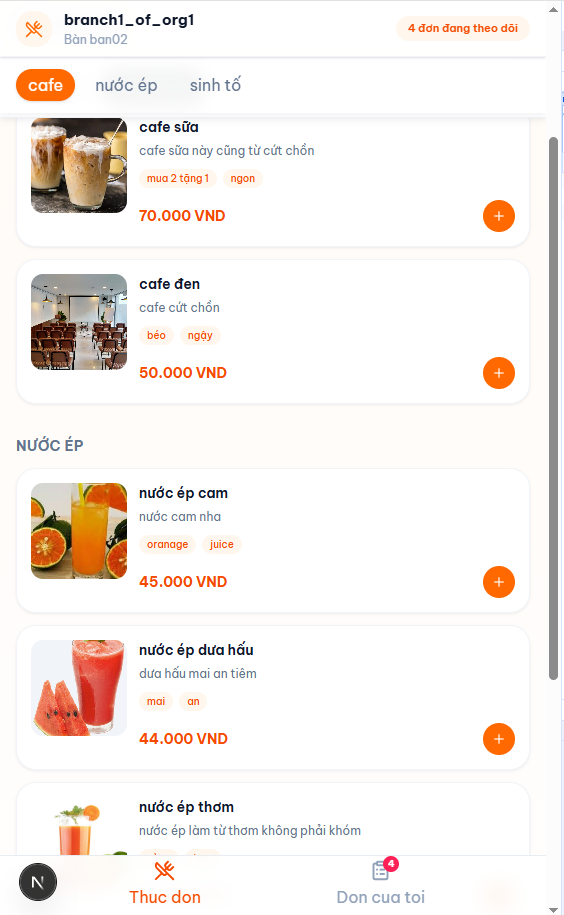
A POS system built for multi-branch restaurants — customers scan a QR code at the table to browse the menu and place orders directly from their phone, no need to flag down a server. Orders are pushed in real time to the kitchen display and cashier station, with staff reviewing and updating the status of each item as it's served. When a table is ready to pay, the bill prints at the counter in a single action. The entire system — NestJS API, Next.js admin dashboard, and customer-facing ordering web — runs on a single shared backend, keeping data in sync across all branches in real time.

AutoHub is the management dashboard built for serious MMO operators — running accounts at scale, daily check-ins, peak-hour ticket sniping, scheduled farming, and any repetitive task that needs to run consistently without manual babysitting. Each customer gets their own dashboard to monitor all running jobs, configure custom schedules per task, or fall back to system defaults. The platform automatically assigns clean proxies from a managed pool for jobs that require them, runs continuously in the background 24/7, and pushes results directly to each customer's Telegram. Support is available via an AI bot for common questions or a direct admin chat when needed. Data is strictly isolated by ownership — your accounts, your run history, your logs are yours alone, invisible to everyone else

CaptchaOCR is a FastAPI micro-service that accepts a 4-digit captcha image in base64 and returns the corresponding integer. The ddddocr pretrained model is loaded once at process startup — every subsequent request is pure inference, with latency in the range of a few tens of milliseconds per image. The service is deployed via PM2 with auto-restart and a hard RAM cap, keeping it stable over long periods without manual oversight.
05.Comments
Leave a few wordsNo comments yet.