BankNotify.
BankNotify is an Android app built in Flutter + Kotlin that runs in the background, listening for balance change notifications from the banking app. When a transfer arrives, the app forwards the notification to a backend via HTTP — the backend parses the content, matches it against a pending order, and automatically fires a callback to complete the payment without any manual intervention.
01.Overview
The big pictureBank-notify-bridge solves a problem that trips up small merchants in Vietnam: no Open Banking API, no MPOS contract, yet they still need to know the exact second a customer transfers money to mark an order as paid. The manual approach today is watching the banking app, spotting a "+50,000 VND" notification, then going into the system to update the order — unless the order comes in at 2am.
The solution: an old Android phone kept permanently plugged in, running this Flutter app. An Android service listens to every notification from banking apps (Vietcombank, MB, TPBank, Techcombank…), extracts title + bigText + timestamp, packages it as JSON, and POSTs it to a backend webhook. The backend parses the amount and transaction code from the body, finds the matching pending order, and automatically calls paymentSuccessCallback — no one needs to be watching. Currently running 24/7 on an old Redmi Note 8, processing ~250 orders per day.
02.Features
What it does- 01Listen for bank notificationsNotificationListenerService · bank package allow-list
NotificationListenerServiceis granted system permission to intercept all notifications on the device, then filters bypackageNameof Vietnamese banking apps — forwarding only what's needed, ignoring everything else. When a notification arrives, the service extractsEXTRA_TITLEand prioritises readingEXTRA_BIG_TEXToverEXTRA_TEXT— because banking notifications tend to be long and the transaction code sits at the end of the string, whileEXTRA_TEXTis often truncated by Android before reaching the most important part. - 02Webhook closes the orderJSON POST · backend match · payment callback
Each notification is packaged as JSON
{ package, title, text, timestamp, type }and POSTed to a URL the user configures themselves. The backend receives the payload, parses the amount and transaction code from thetextfield, finds the matchingpendingorder by transfer content, and automatically callspaymentSuccessto complete the order — the entire flow happens within seconds, no manual steps required at any point. - 03Three keep-alive layersForeground service · BOOT_COMPLETED · START_STICKY
Keeping a phone alive 24/7 requires defence at multiple layers.
FloatingServiceruns in foreground mode with a persistent notification — enough to signal Android to keep it alive under memory pressure rather than killing it. If it still gets killed,START_STICKYinstructs the system to restart the service automatically without any manual action. When the phone reboots,BootReceiverlistens forACTION_BOOT_COMPLETEDand brings the service back up immediately — no one needs to manually open the app after every power cut. - 04Cross-language stateFlutterSharedPreferences · flutter.* keys
The Flutter UI and Android service run as two separate logical processes but share a single source of configuration: the
FlutterSharedPreferencesfile with theflutter.prefix. The two key values areflutter.server_url— the backend webhook URL — andflutter.is_service_running— the current service state. When the user updates the URL in the UI, the service picks up the new value on the very next notification, no restart or extra sync step needed. - 05UI for non-technical ownersPermission gate · status card · one URL field
The interface stays minimal with Material 3: an amber banner appears immediately if Notification Access hasn't been granted yet, with a button that opens directly to Settings to grant the permission without hunting through menus. A status card turns green when the service is running, red when it's stopped — enough for a shop owner to glance at the phone and know whether it's working. A single URL input field and two buttons — Start and Stop — cover everything that needs to be done. No manual needed: green means fine, red means open the app and check.
03.Tech stack
Tools used| App | Flutter 3 · Dart · Material 3 · shared_preferences (config UI) |
| Native Android | Kotlin · NotificationListenerService · Foreground Service (START_STICKY) · BroadcastReceiver (BOOT_COMPLETED) · MethodChannel for Flutter ↔ Native |
| Permissions | BIND_NOTIFICATION_LISTENER_SERVICE (system, granted manually by user) · RECEIVE_BOOT_COMPLETED · FOREGROUND_SERVICE · INTERNET |
| Network | java.net.HttpURLConnection on a Kotlin coroutine (Dispatchers.IO) · 5s timeout · HTTP status logging · Dio as a fallback on the Dart side |
| State | FlutterSharedPreferences (one XML file shared between Dart and Kotlin) · flutter.* prefix · no local database |
| Target | Android 7+ · Redmi Note 8 / any old phone plugged in 24/7 · one device per bank account |
04.How it works
ArchitectureThe entire flow revolves around a single event: onNotificationPosted(sbn) from NotificationListenerService. When the banking app pushes a notification like "+50,000 VND · Balance: 1,234,567 · Ref: ORDER12345…", Android delivers the StatusBarNotification to the service in <100ms. The service reads flutter.is_service_running and flutter.server_url directly from FlutterSharedPreferences — no need to wake the Flutter engine — filters through the package allow-list, packages the payload as JSON, and POSTs it to the backend in an IO coroutine.
The backend receives the payload, for example: { "package": "com.VCB", "title": "Biến động số dư", "text": "+50,000 VND ... ND: ORDER12345", "timestamp": 1712649600000 }. A regex extracts the amount ([+\-]?[\d.,]+\s*VND) and order code (ORDER\d+), matches against the orders table where status='pending' and amount matches → marks as paid, writes bank_txn_id, fires the merchant webhook. Full end-to-end from banking notification to merchant callback: ~1-3s.
"BankNotify isn't a standalone project — it's the payment layer that plugs into e-commerce systems and automation pipelines that need automatic transfer confirmation. Instead of integrating a paid payment gateway or waiting for Open Banking access, the entire payment collection flow closes with just an old Android phone plugged in and running this app. NotificationListenerService is Android's official back door — no root, no screen OCR, no SDK agreement with any bank. Fully legitimate on the owner's own device, reliable enough for ~250 orders a day, and light enough to run indefinitely on the cheapest hardware available."

AutoHub is the management dashboard built for serious MMO operators — running accounts at scale, daily check-ins, peak-hour ticket sniping, scheduled farming, and any repetitive task that needs to run consistently without manual babysitting. Each customer gets their own dashboard to monitor all running jobs, configure custom schedules per task, or fall back to system defaults. The platform automatically assigns clean proxies from a managed pool for jobs that require them, runs continuously in the background 24/7, and pushes results directly to each customer's Telegram. Support is available via an AI bot for common questions or a direct admin chat when needed. Data is strictly isolated by ownership — your accounts, your run history, your logs are yours alone, invisible to everyone else

CaptchaOCR is a FastAPI micro-service that accepts a 4-digit captcha image in base64 and returns the corresponding integer. The ddddocr pretrained model is loaded once at process startup — every subsequent request is pure inference, with latency in the range of a few tens of milliseconds per image. The service is deployed via PM2 with auto-restart and a hard RAM cap, keeping it stable over long periods without manual oversight.
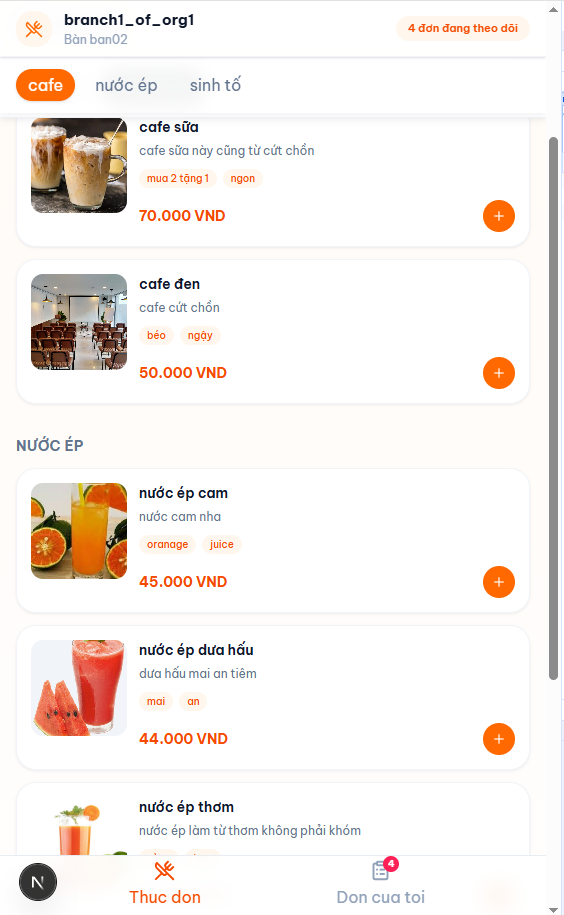
A POS system built for multi-branch restaurants — customers scan a QR code at the table to browse the menu and place orders directly from their phone, no need to flag down a server. Orders are pushed in real time to the kitchen display and cashier station, with staff reviewing and updating the status of each item as it's served. When a table is ready to pay, the bill prints at the counter in a single action. The entire system — NestJS API, Next.js admin dashboard, and customer-facing ordering web — runs on a single shared backend, keeping data in sync across all branches in real time.

A NestJS API that auto-logs into ChatGPT via puppeteer-real-browser (Cloudflare anti-bot bypass), supports email OTP, persists the session for route /ask reuse and directly promt promt, and runs an hourly cron that pings Telegram when the session expires. This allows me to send prompts and receive responses directly through the API without needing to open a browser.
05.Comments
Leave a few wordsNo comments yet.