AutoHub.
AutoHub is a management dashboard for customers subscribed to automation services — managing multiple accounts, daily auto check-ins, peak-hour ticket booking, scheduled account warming, and any other repetitive task. Each customer gets a personal workspace to monitor and schedule jobs, with fully configurable run times or system defaults. Proxies are automatically assigned from a managed pool for jobs that require them, running silently in the background with results pushed directly to each customer's Telegram. Support is available via direct admin chat or automated AI assistance. Strict permission controls ensure complete data isolation between customers.
01.Overview
The big pictureAutoHub was built to solve a very real problem: customers need to run automated processes on a regular basis — booking rooms, buying tickets, tracking prices, refreshing accounts across platforms — but they don't want to, and shouldn't have to, touch a server, a proxy, or a single line of code. Just open the dashboard, pick a job, hit Run, and wait for the phone to buzz with "done".
AutoHub sits between customers and their background automation processes: each customer has their own dashboard to monitor past jobs and create new ones with just a few parameters. The backend automatically selects a suitable proxy from the managed pool (when the job requires it), pushes it into a Bull queue — worker completes → emits event → Telegram bot delivers a notification to that customer's exact chat ID with the result. Common questions are handled by a third-party AI bot; when manual intervention is needed, customers escalate to a direct chat thread with admin / super_admin. An ownership filter is attached to every query, ensuring customer A never sees the jobs, history, or logs of customer B.
02.Features
What it does- 01Job catalog · background runsPick · configure · run · queued → running → done
Customers open the dashboard, select the type of process they want to run, fill in a few parameters (item code / time / quantity…) and submit. The job is pushed into a Bull queue (Redis), picked up by a worker and executed through the lifecycle
queued → running → doneorfailed. Progress and logs stream directly on the dashboard via WebSocket — no page refresh needed. - 02Auto-attached proxy poolCurated pool · proxy_id reference · no string match
All proxy credentials — IP / port / user / pass — are stored centrally in the
proxy_khachtable. Each job only holds aproxy_idrather than copying the connection string, keeping data consistent from a single source. At execution time, the runtime resolvesproxy_id → proxy_khachand injects the credentials into the HTTP client automatically. When a provider rotates an IP, a single one-row update is all it takes — every running job picks up the new value immediately, no further intervention needed - 03Per-customer TelegramJob done → that customer's own chat_id
Each user is assigned their own
telegram_chat_id. When a worker emitsjob.done/job.failed, the notification service immediately pushes a message to that exact chat_id via the Telegram Bot API — including a result summary, a link to the dashboard detail view, and a specific reason if the job failed. All pushes go through a dedicated Bull queue, ensuring they never block or slow down the main processing pipeline. - 04Two-layer customer support3rd-party AI · direct admin chat
By default, customers are assisted by a third-party AI integrated via HTTP API — capable of handling most FAQs around dashboard usage, common error meanings, and service plan details. When an issue falls outside the AI's scope, customers can escalate to a direct chat thread with admin / super_admin in a single action; the thread runs in real time over Socket.IO, with admins seeing who's online directly from their dashboard and responding immediately.
- 05Per-customer data isolationOwnership filter · zero cross-tenant leakage
Every business entity (
jobs, run history, logs, result files) is stamped with auserIdat creation. An interceptor automatically appendsWHERE ownerId = currentUser.idto every query from regular customers, ensuring each person only ever sees their own data — admin / super_admin bypass the filter for full access. Three-level RBAC (role · role_permissions · direct user_permissions) adds an extra layer of control, but the first and most fundamental line of defence remains ownership.
03.Tech stack
Tools used| Core API | NestJS 11 · TypeScript · TypeORM · MariaDB · @nestjs/jwt · @nestjs/passport · passport-jwt · bcrypt · class-validator · @nestjs/swagger |
| Auth & Security | JWT access 15m + refresh 7d · accessKey UUID stored in Redis (single-session) · per-IP brute-force counter on Redis · @nestjs/throttler · crypto-js · node-rsa for sensitive payloads |
| Shared infra | @nestjs/bull (Bull queue on Redis) · @nestjs/schedule (cron) · @nestjs/platform-socket.io (WebSocket gateway) · @nestjs/event-emitter · ioredis |
| Business modules | booking · chat · coin-alert · dckex · nexo · vcex (×5 user) · lucky · proxy (managed IP pool) · telegram bot · logs · public CDN |
| Frontend | Next.js 16 · React 19 · TypeScript · Redux Toolkit · Tailwind 4 · framer-motion · react-toastify · socket.io-client · port 3015 |
| Database | MariaDB (users · roles · permissions · user_roles · role_permissions · user_permissions · logs · plus per-module tables) · Redis (cache + queue + access keys + brute-force counter) |
04.How it works
ArchitectureEvery request entering the platform passes through exactly two guards in a fixed order: JwtAuthGuard first, PermissionsGuard second. In the first guard, JwtStrategy.validate(payload) decodes the token, extracts the accessKey from the payload and compares it against the live key on Redis at auth:session:{userId} — any mismatch returns 401, even if the token hasn't expired, because a new login on another device has already generated a new key and invalidated the old one. Once identity is confirmed, PermissionsGuard reads the @Permissions('user.create') decorator and verifies actual access rights by querying the union (role_permissions & user_permissions) cached in Redis per userId.
Adding a new business module — for example coin-alert — takes exactly 3 steps: (1) create a src/coin-alert/ folder with *.module.ts + controller + service; (2) declare the new permission codes (coin-alert.view, coin-alert.config) in the permissions table; (3) add a Next.js page under pages/coin-alert/ using the shared Layout. The entire infrastructure — auth, logging, sockets, queues, cron — is already there, nothing to rewrite. Once the module has users, the dashboard assigns roles in the UI automatically.
AutoHub is built around one principle: complexity belongs in the infrastructure, not in the hands of the user. The "accessKey" on Redis is the clearest expression of that — JWT is just the transport layer, the key is the real credential. A new login generates a new key, instantly invalidating every previous session with no blacklist, no expiry window, and no extra work. "Logout all devices" becomes the default, not a feature to be built separately. That same philosophy runs through the proxy pool, the Bull queue, the ownership filter, and the way a new module slots in with three steps — AutoHub is designed to run quietly, reliably, and scale without adding complexity.
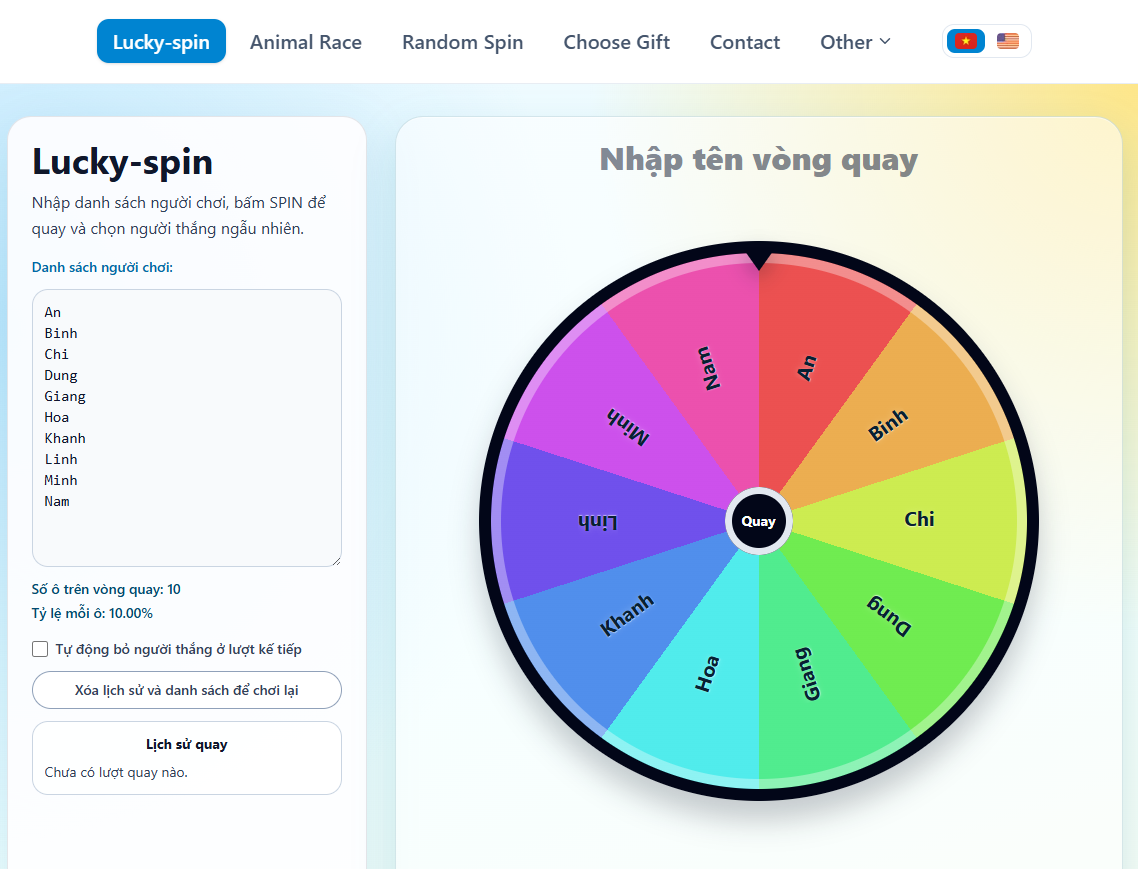
RandomKit is a lightweight collection of randomisation tools that runs entirely client-side — no server, no data sent anywhere. It includes the tools people actually reach for: a customisable spinner with fair probabilities and transparent percentage display, duck racing, a draw lots picker, coin flip, dice roller, random number generator, password generator, and a random location picker on a map. The interface supports both Vietnamese and English, with clean SEO structure so each individual tool is independently discoverable.

ZoomBot is a pool of Chrome bots that automatically join Zoom meetings and wait for remote commands via HTTP API. Each bot runs on its own isolated Chrome instance with its own lock, fully thread-safe — bots don't interfere with each other even when running in parallel. A single API call can instruct any bot to send a chat message, toggle the mic, toggle video, leave the room, or rejoin. When a bot crashes, the system detects it automatically and restarts without any manual intervention. The entire stack is written in Python, Selenium, and Flask — lean enough to run on a standard server without complex infrastructure.
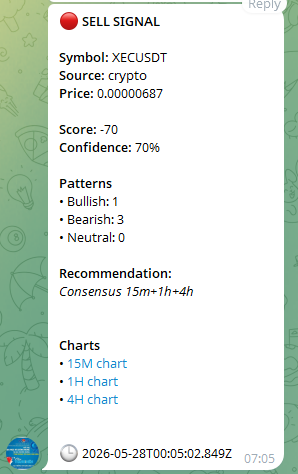
TradingSignals is a personal buy/sell signal tool for crypto and equities — not a mass copy-trading bot, but a system built for one person, backtested against 2–5 years of real market data. NestJS scans simultaneously across multiple timeframes from 15 minutes to 1 month, running in parallel through 4 independent engines: candlestick pattern, indicator, price action and volume analysis. A signal is only recorded when multiple timeframes converge — cutting through noise and surfacing only the entry points genuinely worth attention. After 10 days, the system looks back at each signal — right or wrong — gradually sharpening its accuracy the longer it runs. Results are pushed directly to a personal Telegram the moment a signal fires, with patterns rendered in real time on a TradingView chart embedded in Next.js.
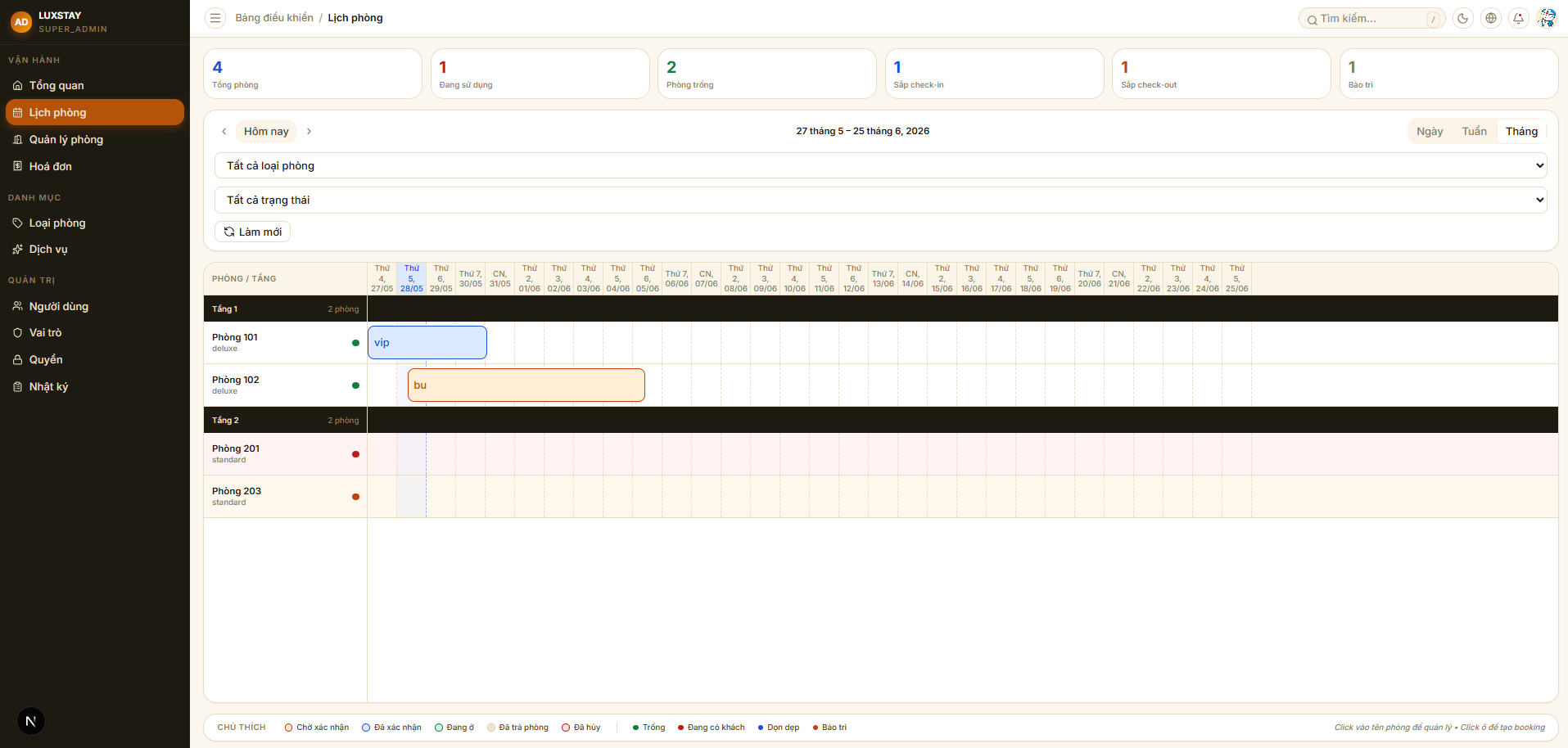
Hotel Management is an internal hotel administration system built for front desk staff and operations managers. The entire core workflow runs within a single system: accepting reservations from walk-in guests or online channels, handling check-in and check-out, recording ancillary services incurred during the stay, and automatically generating invoices at checkout. Permissions are scoped down to individual actions — receptionists, cashiers, and managers each have different screens and access levels. Every change in the system is written to a full audit log, with enough detail to trace back anything when needed.
05.Comments
Leave a few wordsNo comments yet.