RestaurantOS.
A POS system for multi-branch restaurants — customers scan a QR code at the table to order, staff receive and process each order in real time, and bills print at the counter on checkout. The entire operation runs on a single shared backend, serving the NestJS API, the admin dashboard, and the customer-facing ordering web simultaneously — both front-ends built in Next.js.
01.Overview
The big pictureRestaurantOS grew out of the daily reality of a small 3-branch restaurant chain. During the lunch rush, staff took orders on paper and read them out to the kitchen — every menu change, wrong table, or extra side dish meant another trip back and forth between the table, the kitchen, and the cashier. At the end of the day, the books never quite added up, and no one could tell where things went wrong.
The answer was three apps sharing a single API: a customer web — scan the QR code at the table to browse the menu and place orders directly into the system, no staff needed; an admin dashboard for floor staff, kitchen, and managers — approve orders, update the status of each item, and print bills at checkout; and a multi-tenant NestJS API running across branches with per-branch RBAC scoping, audit logs down to the order item level, and Socket.IO keeping every change in sync across the entire system in real time.
02.Features
What it does- 01QR orderingGuest scans · no app, no signup
Each table has its own QR code tied to the current open session. Customers scan with their phone camera and the Next.js customer web opens instantly — no app to download, no login required. From there they browse the menu by category, add items, leave notes if needed, and submit. The order hits the backend via HTTP and is immediately broadcast to the admin dashboard over Socket.IO — staff and kitchen see the new order the moment the customer confirms.
- 02Multi-tenant by branchOrg → branches · per-branch RBAC
The system is structured around an
organizations → branchesmodel: one company managing multiple independent branches. Permissions are handled through theuser_branch_rolestable — the same account can act as a manager at branch A and a cashier at branch B, with data kept entirely separate between the two. Each person only ever sees what they are permitted to see at the branch they are working in. - 03Realtime order lifecyclepending → preparing → served · per item
Each order moves through the lifecycle
pending → confirmed → preparing → served, or branches intocancelledwhen needed. Beyond the order itself, everyorder_itemcarries its own status, letting the kitchen tick off individual dishes independently rather than waiting for the entire table to be complete. Every state transition is written toorder_audit_logsand pushed in real time over a per-branch Socket.IO room — managers, cashiers, and kitchen staff always see the same state at the same moment. - 04Bills + print trackingSnapshot · print count · void with reason
Bills are settled from the session using the formula
subtotal − discount + tax = total, withpaymentMethod,paidBy, andpaidAtrecorded at the moment of payment. Each print incrementsprintCountwhile the system automatically tracksfirstPrintedAt/lastPrintedAt— enough to trace back if a dispute arises. Voiding a bill requires avoidReasonwithout exception, blank voids are not permitted. The front-end handles printing directly viareact-to-print, no driver or middleware required. - 05Menu CMS + drag-dropCategories · items · sort · soft delete
The menu admin page uses
dnd-kitfor drag-and-drop reordering of categories and items — no manual index entry needed. Each item supports multiple image uploads, anisAvailabletoggle to hide it temporarily when ingredients run out without deleting it. Rather than hard deletion, the system uses soft delete viadeletedAt— removed items are retained in order history, ensuring billing records and reports remain intact
03.Tech stack
Tools used| API | NestJS 11 · TypeScript · TypeORM (migrations + seeds) · Passport JWT · class-validator · Swagger · Throttler · Terminus health |
| Admin | Next.js 16 · React 19 · TypeScript · Redux Toolkit · TanStack Query + Table · react-hook-form + zod · dnd-kit · recharts · react-to-print · Tailwind 4 |
| Guest | Next.js 16 (port 3002) · React 19 · TanStack Query · socket.io-client · Tailwind 4 — no Redux, no heavy forms |
| Database | Postgresql (organizations, branches, menus, sessions, qr_codes, orders, order_items, bills, audit_logs) · soft delete · decimal prices |
| Realtime | Socket.IO (OrderGateway + GuestGateway) · Redis adapter for multi-instance · per-branch / per-session rooms |
| Infra | Docker · GitHub Actions · server-side QR generation (qrcode) · Excel export (exceljs) |
04.How it works
ArchitectureThe heart of the system is the table session. When a staff member opens a table, the backend creates a new table_sessions record (status=open) alongside a qr_codes entry tied 1-1 to that session. The QR encodes a URL containing the session token — scanning it opens the customer web directly into the correct session, and every order submitted is validated against that token. Close the session → the token is invalidated immediately, the QR can no longer be scanned.
Each session carries an order_mode flag to adapt to the situation: false (default) — customer orders enter pending state and wait for staff approval before reaching the kitchen; true — auto-confirm, used during peak hours when the counter can't keep up with manual approvals. When an order is created or changes state, SocketService emits into the branch:{branchId} room so every kitchen and counter screen in the same branch receives the update in <120ms. Every cancelled item or price change leaves a row in order_audit_logs — nothing goes unrecorded.
"The core of RestaurantOS is the tableModule — each table isn't just a physical seat, it's the entry point for the entire service flow. When a staff member opens a table, tableModule connects directly to sessionModule to create a new session, and at that exact moment a new QR code is generated and tied 1-1 to that session. Customers scan the QR and step into the correct open session for their table — no mix-ups, no overlap with the previous sitting."

A NestJS API that auto-logs into ChatGPT via puppeteer-real-browser (Cloudflare anti-bot bypass), supports email OTP, persists the session for route /ask reuse and directly promt promt, and runs an hourly cron that pings Telegram when the session expires. This allows me to send prompts and receive responses directly through the API without needing to open a browser.

AutoHub is the management dashboard built for serious MMO operators — running accounts at scale, daily check-ins, peak-hour ticket sniping, scheduled farming, and any repetitive task that needs to run consistently without manual babysitting. Each customer gets their own dashboard to monitor all running jobs, configure custom schedules per task, or fall back to system defaults. The platform automatically assigns clean proxies from a managed pool for jobs that require them, runs continuously in the background 24/7, and pushes results directly to each customer's Telegram. Support is available via an AI bot for common questions or a direct admin chat when needed. Data is strictly isolated by ownership — your accounts, your run history, your logs are yours alone, invisible to everyone else
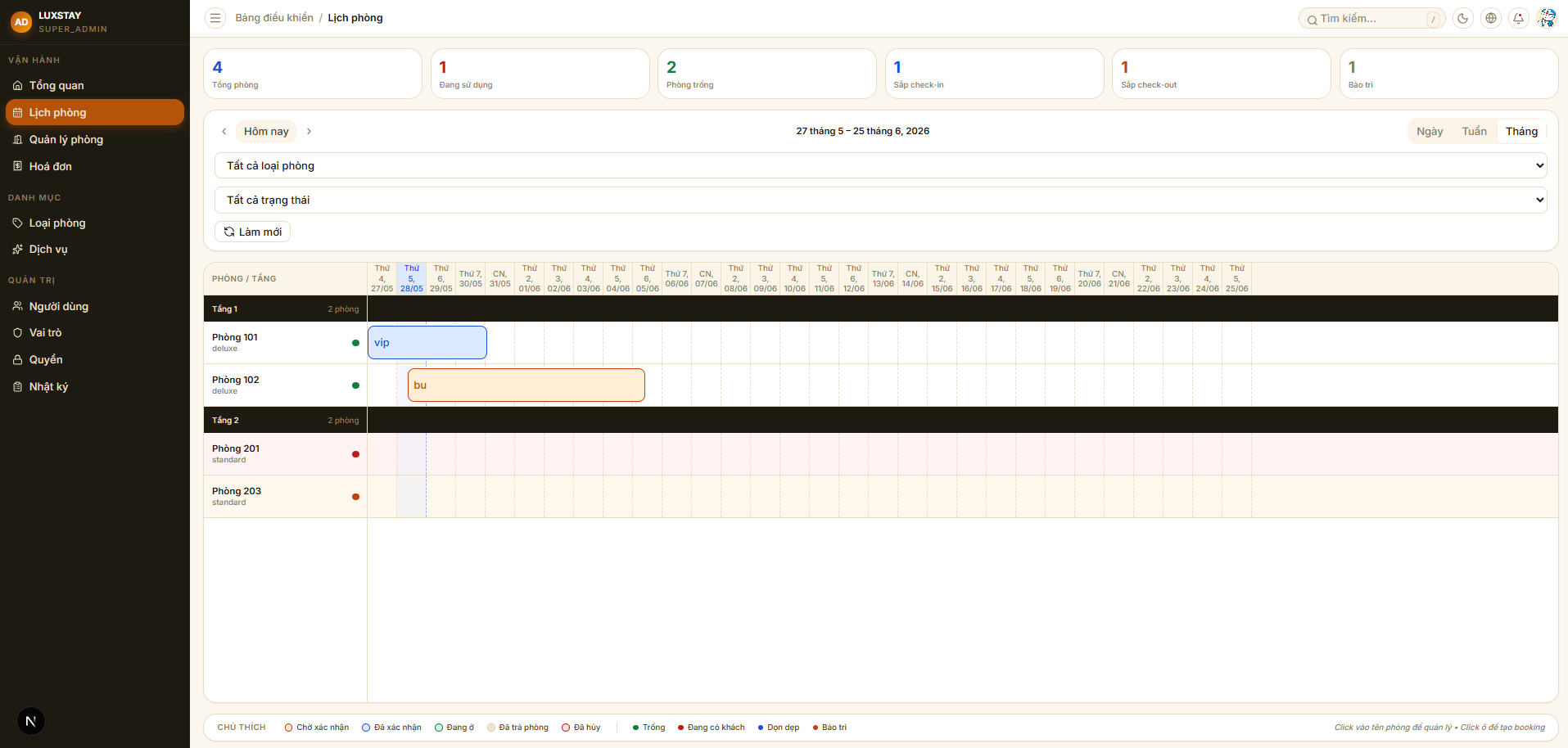
Hotel Management is an internal hotel administration system built for front desk staff and operations managers. The entire core workflow runs within a single system: accepting reservations from walk-in guests or online channels, handling check-in and check-out, recording ancillary services incurred during the stay, and automatically generating invoices at checkout. Permissions are scoped down to individual actions — receptionists, cashiers, and managers each have different screens and access levels. Every change in the system is written to a full audit log, with enough detail to trace back anything when needed.
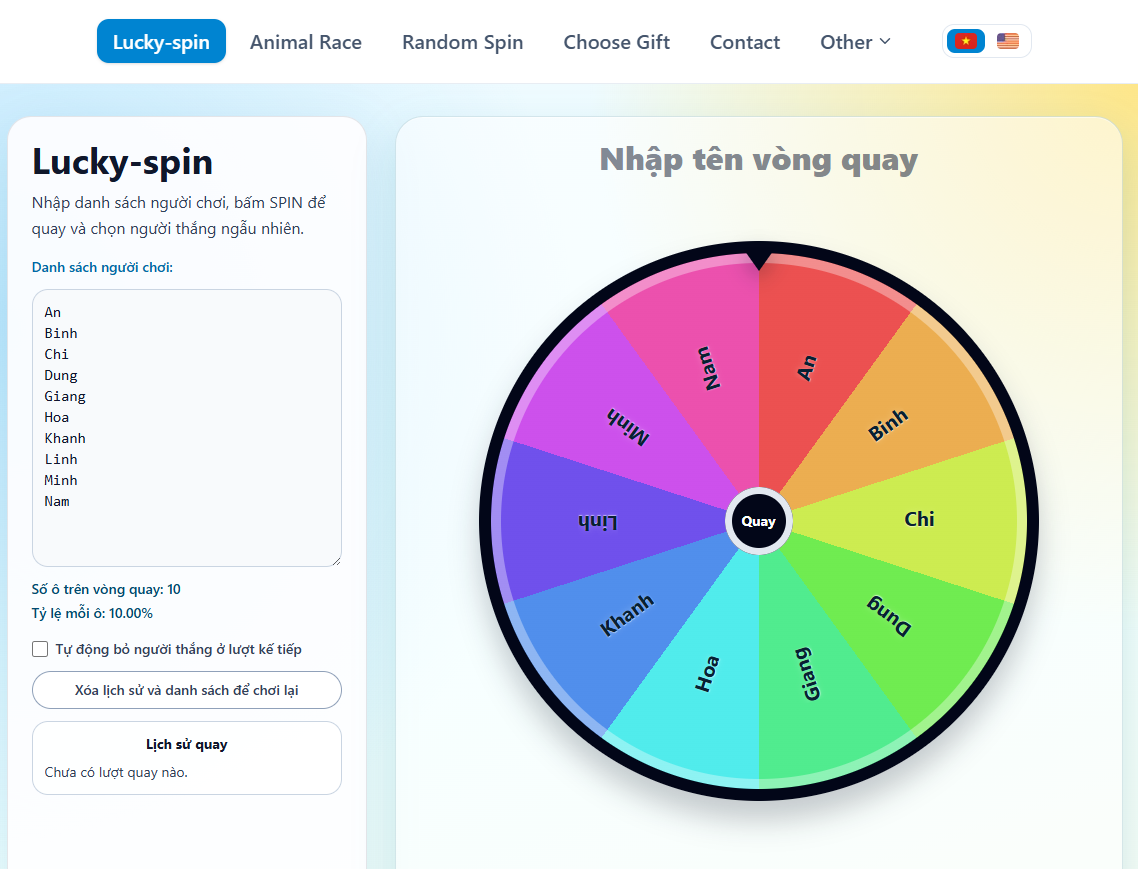
RandomKit is a lightweight collection of randomisation tools that runs entirely client-side — no server, no data sent anywhere. It includes the tools people actually reach for: a customisable spinner with fair probabilities and transparent percentage display, duck racing, a draw lots picker, coin flip, dice roller, random number generator, password generator, and a random location picker on a map. The interface supports both Vietnamese and English, with clean SEO structure so each individual tool is independently discoverable.
05.Comments
Leave a few wordsNo comments yet.