ZoomBot.
A pool of headless Chrome bots auto-joining Zoom meetings, driven over an HTTP API and self-healing on crash — Python + Selenium + Flask, one Chrome per bot, per-bot locks, thread-safe.
01.Overview
The big pictureZoom-bot started from a very simple question from a friend: "Is it possible to have multiple accounts join Zoom at the same time?" From there I began experimenting with Chrome automation to simulate multiple participants joining the same meeting. After a lot of tuning around browser profiles, resource usage, and network stability, the system can run 20 bots simultaneously on a single machine — as long as the network holds up.
Everything is packaged into a single Python process: main.py spawns N bots (each with its own Chrome instance and a temporary user-data-dir), a health loop daemon running every 20 seconds to automatically restart any bot that dies, and a Flask API for remote control. Version v0.4 runs stably for hours at a time with 20 bots in parallel, each consuming around ~100MB RAM.
02.Features
What it does- 01Isolated Chrome poolOne Chrome · one tempdir · one lock
Each bot is an independent
webdriver.Chromeinstance with--user-data-dirpointing to its own temporary directory fromtempfile.mkdtemp— completely isolated browser profiles, nothing shared between bots. Each bot holds its ownRLock, ensuring 2 concurrent requests to the same bot queue up sequentially rather than racing on the driver. One Chrome crashing takes nothing else down with it. - 02HTTP control planeFlask · chat · chat-all · mic · video · leave · rejoin
Flask 3 runs in threaded mode, serving the full set of control endpoints:
POST /chatsends a message to a specific bot by name,POST /chat-allbroadcasts in parallel to the entire pool viaThreadPoolExecutor.POST /bots/<name>/micand/videotoggle the mic and camera on individual bots,/leaveand/rejoincontrol meeting presence.GET /botsreturns the full bot list with current status,/healthconfirms the system is alive. - 03Health check & auto-restart20s loop · rate-limit · backoff
A daemon thread runs in the background, scanning every slot every 20 seconds to check each bot's health by reading
driver.titleandcurrent_url. If a bot stops responding or returns unexpected values,_restart_slotis called — the old Chrome is killed, a new instance spins up, and the bot rejoins the meeting. To prevent an infinite restart loop when a bot keeps crashing, the system uses a 1-hour sliding window: onceMAX_RESTART_PER_HOUR=5is exceeded, the slot is flaggeddisabled=trueand halted entirely until manual intervention. - 04Random mic/video per botmicro_video_random · per-instance prefs
Enabling
micro_video_random=trueactivates a more realistic simulation mode: every time a bot spawns — including restarts after a crash —_pick_av_state()independently randomises the mic and video state for that bot. Chrome prefs ALLOW/BLOCK are built separately per instance, never shared across bots. The result is a meeting with a natural mix of participants — some with mic on, some off, some with camera on, some off — closer to the behaviour of a real group of users than a uniform bot pool. - 05Polling dashboardVanilla HTML · poll /bots · per-bot controls
A single static
dashboard.htmlfile, no build step required, polls/botsand/healthevery few seconds to display the full pool status in real time. Each bot shows its current state —alive / disabled / manual_offline— along with mic and video status, and the number of restarts in the past hour. A row of buttons per bot allows toggling mic, toggling video, leaving, or rejoining directly from the page. Open a browser and it works, nothing else to install.
03.Tech stack
Tools used| Language | Python 3.8+ · type hints · dataclasses (BotSlot) |
| Browser | Selenium 4.6+ · Chrome headless=new · Selenium Manager (auto-managed chromedriver) · per-bot temp --user-data-dir |
| API | Flask 3 (threaded=True) · JSON in / out · ThreadPoolExecutor for /chat-all |
| Concurrency | main thread (entry + hotkey) · daemon health loop · Flask worker threads · per-bot RLock · stop_flag (Event) for orderly shutdown |
| Reliability | Health probe (driver.title + current_url) · auto-restart · sliding-window 5/h rate-limit · screenshot + DOM dump on join failure |
| Dev tools | keyboard (Alt+Ctrl+Shift+E exit hotkey) · logging (console INFO + file DEBUG) · dump_after_join to refresh selectors |
04.How it works
ArchitectureThe threading model is lean but the order has to be right: main thread runs a hotkey loop waiting for an exit signal; a daemon health-loop scans all slots every 20 seconds; a daemon Flask serves HTTP with threaded=True. Every Selenium operation goes through ZoomBot.lock — an RLock per bot — ensuring 2 concurrent /chat requests to the same bot queue up sequentially. /chat-all fires in parallel via ThreadPoolExecutor and stays safe because each worker acquires only its own bot's lock.
The trickiest part is setting mic and video state after joining: Zoom Web Client encodes state in the button's aria-label — mute my microphone means mic is ON, unmute my microphone means it's OFF. Matching requires substring logic and checking 'unmute' before 'mute' — because 'unmute' contains 'mute' as a substring. This bug caused mic to always appear enabled regardless of config in v0.3, fixed in v0.4. When WebElement.click() fails to trigger the React handler headlessly, the fallback is a JS click.
The most time-consuming part of building ZoomBot wasn't spawning Chrome instances or wiring up the Flask API — it was correctly reading mic state from an aria-label. Zoom Web Client exposes no clean state attribute, no data attribute, no class toggle — just a text string in the label that changes depending on language and version. The v0.3 bug lived exactly there: checking 'mute' before 'unmute' meant mic state was always read as ON. One prefix string, a few hours of debugging.
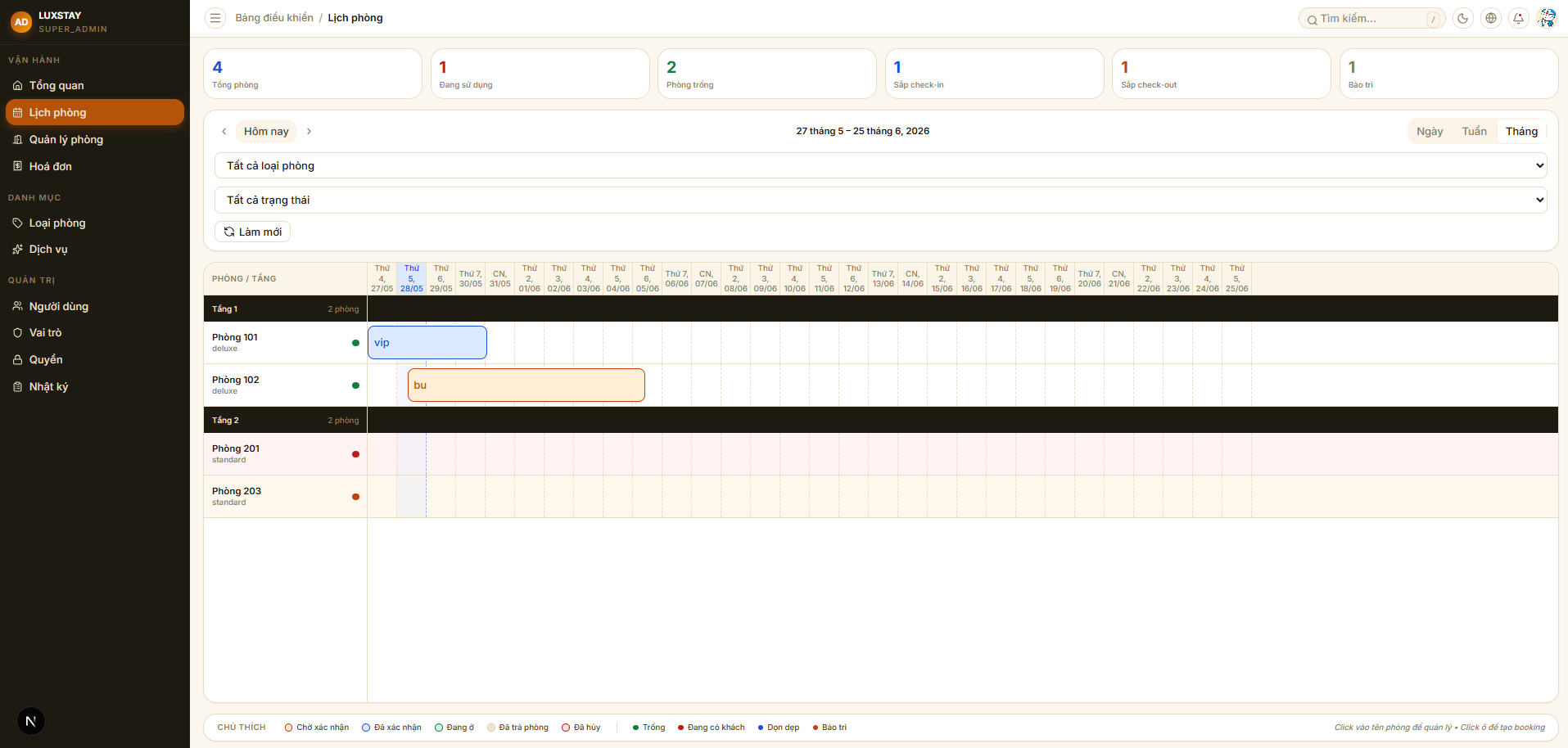
Hotel Management is an internal hotel administration system built for front desk staff and operations managers. The entire core workflow runs within a single system: accepting reservations from walk-in guests or online channels, handling check-in and check-out, recording ancillary services incurred during the stay, and automatically generating invoices at checkout. Permissions are scoped down to individual actions — receptionists, cashiers, and managers each have different screens and access levels. Every change in the system is written to a full audit log, with enough detail to trace back anything when needed.
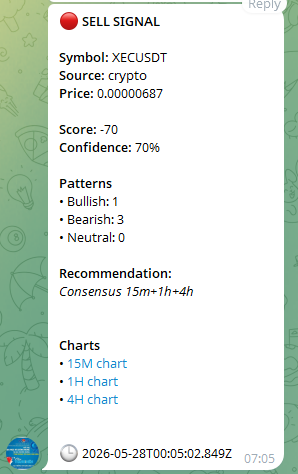
TradingSignals is a personal buy/sell signal tool for crypto and equities — not a mass copy-trading bot, but a system built for one person, backtested against 2–5 years of real market data. NestJS scans simultaneously across multiple timeframes from 15 minutes to 1 month, running in parallel through 4 independent engines: candlestick pattern, indicator, price action and volume analysis. A signal is only recorded when multiple timeframes converge — cutting through noise and surfacing only the entry points genuinely worth attention. After 10 days, the system looks back at each signal — right or wrong — gradually sharpening its accuracy the longer it runs. Results are pushed directly to a personal Telegram the moment a signal fires, with patterns rendered in real time on a TradingView chart embedded in Next.js.

CaptchaOCR is a FastAPI micro-service that accepts a 4-digit captcha image in base64 and returns the corresponding integer. The ddddocr pretrained model is loaded once at process startup — every subsequent request is pure inference, with latency in the range of a few tens of milliseconds per image. The service is deployed via PM2 with auto-restart and a hard RAM cap, keeping it stable over long periods without manual oversight.
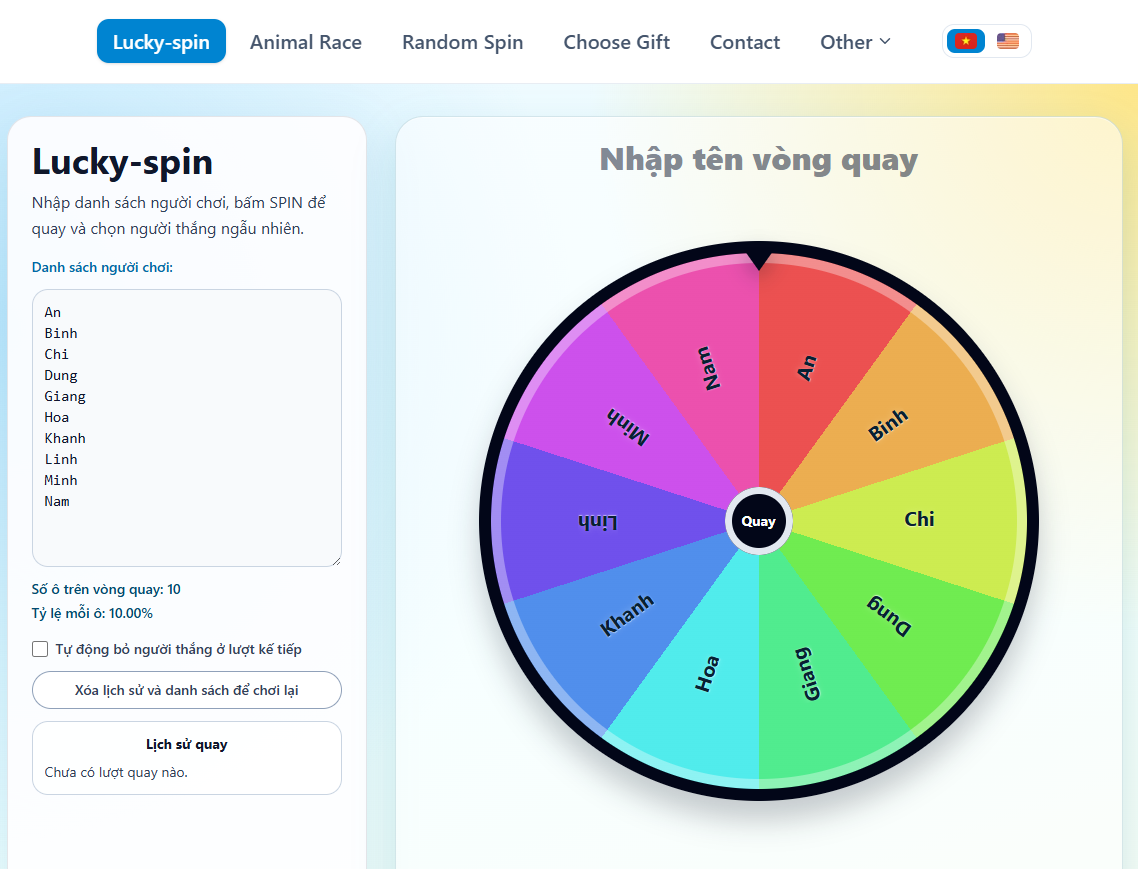
RandomKit is a lightweight collection of randomisation tools that runs entirely client-side — no server, no data sent anywhere. It includes the tools people actually reach for: a customisable spinner with fair probabilities and transparent percentage display, duck racing, a draw lots picker, coin flip, dice roller, random number generator, password generator, and a random location picker on a map. The interface supports both Vietnamese and English, with clean SEO structure so each individual tool is independently discoverable.
05.Comments
Leave a few wordsNo comments yet.